
Free Website Health Check
Check your website’s health for free in under a minute. Enter your web address and this tool runs a read-only public check of your SSL/HTTPS certificate, server response, mobile readiness, security headers and visible WordPress or plugin signals.
It doesn’t log in, doesn’t need a password and doesn’t change anything on your site. It’s built by Martin at Veloce IT, a small WordPress support business in Bromley, Kent, for small business owners who want a quick, honest starting point.
Free Website Health Check
Enter a website address to run a quick public check for SSL, speed response, mobile readiness, security headers and visible WordPress/plugin signals.
Free automated check or £49 manual diagnostic?
The free check is an instant, automated scan of what your website shows publicly: SSL, response, mobile readiness, security headers and visible WordPress signals. It’s a quick starting point, not a full review.
The £49 website diagnostic is the upgrade. It’s a one-off, detailed technical health check of one website that combines automated testing with my own manual investigation. It finds performance, security, SEO and usability issues and explains what to fix. It’s a diagnostic, not repair work.
What the £49 diagnostic covers
- Performance & speed: desktop and mobile analysis, Core Web Vitals, oversized images and inefficient assets, caching and compression, render-blocking resources and other bottlenecks.
- Security & SSL: SSL validity and HTTPS configuration, security headers and configuration weaknesses, mixed content, exposed sensitive files or directories, WordPress version and technology exposure, and obvious misconfigurations. It’s non-invasive, not a penetration test.
- Technical SEO: titles and meta descriptions, heading structure (H1–H6), XML sitemap and robots.txt, indexability and canonicals, broken internal links on the assessed pages, basic structured data validation and mobile SEO.
- Functionality & usability: manual desktop and mobile layout inspection, navigation and menus, rendering problems, missing images or broken assets, contact form presence and visible validation, and basic accessibility (contrast, alt text, form labels). No live form submissions or transactions without your permission.
- WordPress health (where applicable): publicly visible WordPress issues, exposed plugin or theme information, obvious configuration risks, and recommended checks that would need admin access.
- Your report: a PDF with an overall health summary, findings grouped by performance, security, SEO and usability, each rated High/Medium/Low with why it matters, specific recommendations and a prioritised action list.
Scope: one public website/domain; up to five representative pages, including the homepage; public testing only; automated plus targeted manual review; one electronic report. No changes are made to your site, and no admin access is required.
Not included
- Repairs or development work
- Malware removal or penetration testing
- Full WCAG accessibility certification
- Google Search Console or Analytics audits
- Admin-level WordPress or plugin audits
- A full-site crawl
- Ongoing monitoring or support
- Guaranteed rankings or performance
The outcome: you know what’s wrong, why it matters and what to fix first. It’s a clear, independent assessment without committing to expensive development work. Ask for a £49 diagnostic
What this website health check actually checks
This is a public website check. It looks at information that can be seen from outside your website without administrator access. You can see the sample below, this is public information and no site access is needed. For a deeper inspection, admin access would be required. For help understanding the report, contact me today for a no obligation chat.
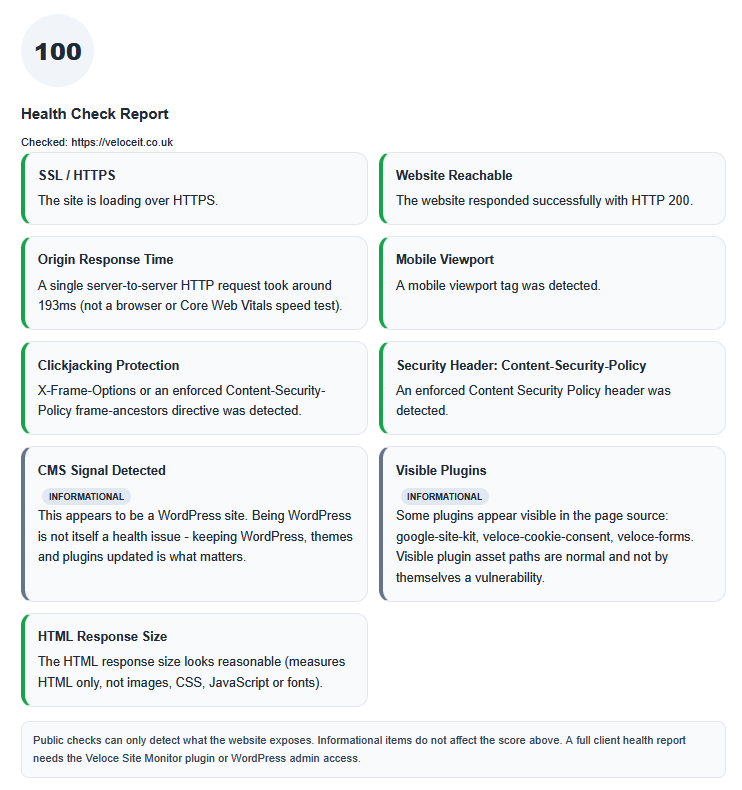
SSL and HTTPS
The check looks for a working secure HTTPS connection.
SSL helps protect information travelling between your website and its visitors. Problems with HTTPS can also lead to browser warnings and reduce confidence in the site.
Website response
The checker records how the website responds when it is requested.
A slow response does not automatically mean a website is badly built, but it can be an early sign of hosting, configuration or performance problems worth investigating.
Mobile readiness
The check looks for basic signals that indicate whether the website has been prepared for different screen sizes.
This is a basic public check rather than a full visual mobile test.
Security headers
Security headers allow a website to give browsers additional instructions about how content should be handled.
The check looks for commonly used headers that are publicly visible and highlights obvious gaps.
Missing headers do not automatically mean a website has been hacked or is insecure, but they can identify areas worth reviewing.
Visible WordPress and technology signals
Where they are publicly detectable, the checker may identify signs that a website uses WordPress or other visible website technology.
This is limited to information exposed publicly by the website.
What the result means
The health check is designed to give you a useful starting point, not a pass-or-fail certificate.
A warning means the checker has found something worth looking at. It does not necessarily mean there is a serious fault.
Likewise, a clean result does not prove that the website is secure, fully updated or problem-free.
Some of the most important parts of a WordPress website cannot be checked from outside.
What a public website check cannot see
Without access to the website itself, this tool cannot reliably check things such as:
- WordPress core update status
- installed plugin versions
- theme versions
- whether backups are working
- WordPress user accounts
- private security settings
- database problems
- problems visible only inside WordPress
- whether a backup can actually be restored
The checker also does not perform intrusive security testing.
It does not attempt to break into, exploit or modify the website.
Why I built the health check this way
My name is Martin and I run Veloce IT, providing practical WordPress support for small businesses.
A lot of website problems begin with something fairly ordinary: an expired certificate, a slow server response, an update that has been missed, a configuration problem or a warning that nobody has noticed yet.
The public health check is intended to make some of those visible signals easier to spot without giving anybody access to your website.
If it identifies something unusual, the next step is to understand why it has been flagged before deciding whether anything needs changing.
Found something you don’t understand?
You do not need to fix every warning just because a checker has found one.
Some findings are important. Some are improvements rather than faults. Others may be completely reasonable for the way a particular website is configured.
If you are unsure about a result, I can help investigate it and explain what actually needs attention.
Depending on the problem, that might involve:
- a one-off WordPress fix
- checking WordPress updates
- reviewing a suspected malware or security problem
- checking backups
- or looking at ongoing WordPress maintenance
The aim is to fix the actual problem rather than sell you work you do not need.
Need a deeper WordPress health check?
The free checker can only work with information your website exposes publicly.
For websites I manage or can access through WordPress, a deeper review can also look at areas such as updates, plugins, themes, backups, configuration and other information that cannot be reliably assessed from outside the site.
If the free check has raised a concern, contact Veloce IT and tell me what it found.
Frequently Asked Questions
Is the website health check free?
Yes. The public website health check is free to use.
Will the check change anything on my website?
No. The public checker performs read-only checks and does not change your website, files or settings.
Do you need my WordPress password?
No. The free public check does not need WordPress administrator access.
A more detailed investigation may require access, but that would be discussed separately.
Does a clean result mean my website is completely secure?
No.
The checker only reviews publicly visible signals. It cannot see everything happening inside WordPress, your hosting account or your database.
Does a warning mean my website has been hacked?
No.
A warning means something has been identified that may deserve a closer look. It needs to be interpreted in context.
Does it work on non-WordPress websites?
Yes for the SSL, response, mobile readiness and security header checks. The WordPress-specific signals only appear where WordPress is publicly detectable.
What does the £49 diagnostic add over the free check?
Manual investigation of up to five representative pages on top of automated testing, covering performance (including Core Web Vitals), security, technical SEO, usability and public WordPress health. It comes with a PDF report rating each finding High/Medium/Low and a prioritised action list. See what’s covered
Does the £49 diagnostic need my WordPress login or fix anything?
No to both. It’s public, non-invasive testing only, and it’s an assessment rather than repair work. Fixes can be quoted separately.
My result shows warnings. What next?
You don’t have to fix every warning. Some are improvements rather than faults. If you’re unsure, send me the result and I’ll explain what actually needs attention.